
MakerBot has released its 2020 3D Printing Trends Report, and there are some very interesting findings within it.
Honestly, I didn’t realize MakerBot did these reports, but I eagerly read them from any vendor, because they are one of the few ways to gauge the actual feelings of 3D print operators. Often the findings are obvious, like the fact that there are more plastic 3D printers than metal, but sometimes there are some unusual findings that hint at things to come.
The survey was done within MakerBot’s network, and they explain how the data was collected:
“MakerBot surveyed over 1,200 professionals who are in its global network, from August 21-26, 2020. Respondents were based in North America (50%), Europe (20%), Asia (13%), Oceania (6%), Latin America (4%) South America (4%), Africa (2%), and the Middle East (1%). Respondents represented more than 20 industries, including Military & Defense, Aerospace, Automotive, Medical & Dental, Industrial Goods, Arts & Entertainment, and Consumer Goods. Job roles varied, with 37% in engineering or development, 20% in design, 9% in print / lab operations, 9% in senior management roles, 7% in production or manufacturing, 1% in procurement, 1% in supply chain operations, and 16% in other roles across their organization.”
As this is a survey of existing MakerBot contacts, you can understand that all participants are familiar with 3D printing and in particular MakerBot’s target market activities.
What’s of interest is to understand how the pandemic has affected the plans for the future in these businesses. Some, like aerospace, have been particularly hard hit and one might expect them to curtail 3D printing activities and purchases, if not shut down operations entirely in some cases.
For a company like MakerBot that has shifted its target to such industries, it’s critical to know where these operations are headed in 3D printing. Thus, the survey.
I read through the material and noted some interesting findings. Let’s take a look.
3D Print Customization
“Customization is the number one reason respondents use 3D printing”
3D printing indeed provides the ability to customize each and every part, quite unlike traditional mass production. If this is indeed the number one reason for having a 3D printer in a business, there must be a considerable amount of customization taking place. But what is it? I can understand personalizing wearables and medical apparatuses, but what kind of customization takes place in, say, a factory? This is something where we need a deeper dive.
3D Printer Buying Intentions
”74% of respondents said they plan to invest in 3D printing over the next year” and “56% of respondents said that COVID-19 did not impact their investment plans in 3D printing”
This is quite notable. Many companies are suffering badly due to the pandemic and have severely curtailed operations, while few are stable and a very few have benefited. It’s surprising that among MakerBot’s 1,200 survey participants the majority of them appear unaffected. That’s incredible news for MakerBot and indeed other 3D printer manufacturers, who might now see their markets still viable.
Another interesting finding is that among their respondents, most were using some other making technologies, with CNC machining being used by about half of the respondents. Other popular processes included milling, casting, injection molding and more. Only TWO percent did not use another process. This suggests that MakerBot’s respondents are typically in some kind of workshop or factory, confirming their switch from the DIY market.
Low-Volume Production
An incredible 68% of respondents said they used 3D printing for low-volume production and 47% used it for on-demand production. This is quite notable, as prototyping used to be almost the only use for desktop 3D printers. Evidently that is no longer the case, and further, it seems that many operations have latched on to the low-volume production concept. This alone could be the reason for the increased investment in 3D printing, as that’s the way to increase production volumes: buy more devices.
An astonishing nine percent of respondents said:
“I do not know anything about 3D printing or its benefits”
This is quite curious, but could be due to previous acquisitions of equipment by a forward-thinking individual who departed the company, leaving behind a machine that no one knows how to use. I suspect this area is one that MakerBot and other 3D printer manufacturers could exploit, as it seems there are a substantial number of companies that still do not “get it”. Note that tht nine percent was WITHIN MakerBot’s contacts, and there are very likely vastly higher numbers of others outside of MakerBot’s space that don’t understand the benefits of 3D printing yet.
3D Printer Purchasing Factors
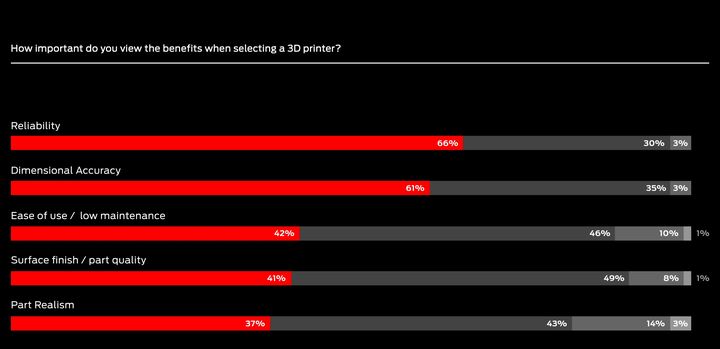
The three primary factors for selection of a 3D printer for purchase were:
- Print accuracy and resolution
- Functionality of printed parts
- Repeatability of production
Notice anything missing?
I do: “Cost”.
Cost appeared way down the list at only 39%. It seems that these respondents generally are more interested in the function of the machine rather than its cost. Another way to look at this is that they may feel the cost of the machine is insignificant compared to the benefits and output they generate with it. That’s a compelling equation and could be contributing to the suggested increase in investment. The machines seem to be of good value to these folks.
There’s plenty more in this interesting report, which is available free of charge at the link below.
Via MakerBot
