
Sponsors

Recommended
  • Rule 34
    Rule 34
    by Charles Stross

    Stross delves into a possible future where 3D printers become commonplace - and explores the problems that could result. 

  • Printing in Plastic: Build Your Own 3D Printer (Technology in Action)
    Printing in Plastic: Build Your Own 3D Printer (Technology in Action)
    by James Floyd Kelly, Patrick Hood-Daniel
  • 3Dconnexion SpaceNavigator SE (Standard Edition) 3D Navigation Device USB ( 3DX-700028 )
    3Dconnexion SpaceNavigator SE (Standard Edition) 3D Navigation Device USB ( 3DX-700028 )
    3D Connexion
  • The Homebrew Industrial Revolution: A Low-Overhead Manifesto
    The Homebrew Industrial Revolution: A Low-Overhead Manifesto
    by Kevin A. Carson
  • Mastering Blender
    Mastering Blender
    by Tony Mullen
  • Kindle Wireless Reading Device (6
    Kindle Wireless Reading Device (6" Display, Global Wireless, Latest Generation)
    Amazon.com
  • Blender 3D 2.49 Incredible Machines
    Blender 3D 2.49 Incredible Machines
    by Allan Brito
  • Makers
    Makers
    by Cory Doctorow
  • 3Dconnexion SpacePilot PRO - 3D motion controller - 31 button(s) - wired - USB
    3Dconnexion SpacePilot PRO - 3D motion controller - 31 button(s) - wired - USB
    3D Connexion

Entries in color (8)

Tuesday
May292012

The Objet Color Mystery: Solved

As we wrote the other week, some startling 3D prints were put on display in Paris' Pompidou Centre. Startling not only because of their intricate shapes and elegant coloring, but also because they were apparently produce on an Objet 3D printer - but Objet does not sell a color 3D printer. When confronted, Objet declined to say anything other than that it's "experimental".
 
What's going on? 
 
We found the answer at Rapid 2012 by speaking to Objet representatives, who said that the art objects were printed on a regular Objet Connex 3D printer. The difference was merely in the materials used. Evidently their experiment is with new, unannounced colored print materials. 
 
But how were they used to create those vivid colors? The answer, it turns out, is quite simple. Objet's technology is capable of mixing two materials together. Up to now this capability has been used to 3D print objects with hard and soft components in an single print operation. Amazing stuff for sure - but what if the two materials had the same rigidity but were different colors? 
 
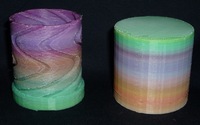
Sure enough, when we re-examined the photos we took at Centre Pompidou in person last week it is now quite clear what happened. Each of the prints is actually composed of only two colors or mixes of the two. 
 
When will these new colored materials be available? No comment on that from Objet, but we suspect they'll show up not too long in the future. 
Thursday
May172012

A New 3D Printer From Objet?

There's something brewing at Objet, makers of the Connex line of commercial 3D printers. First we saw a mysterious art exhibition of color objects apparently produced on a color-capable Objet 3D printer - but there are no color-capable Objet 3D printers! Then we hear that Objet issued a press release indicating the art was produced on an unannounced Objet color-capable 3D printer. 
 
Yesterday we read a post and watched video on Objet's blog saying:
 
"On the 22nd of May we’re launching our latest 3D printer. All I can say for now are 3 words: Professional. Versatile. Desktop."
 
Mysterious for not much longer. 
 
However, we suspect they forgot one thing and need four words: "Professional. Versatile. Desktop. Color."
 
Via Objet
Monday
May072012

The Secret Color Process

As much as we'd like to have attended Neri Oxman's talk at Centre Pompidou in Paris the other day, we were simply unable to get there. However, we were able to view videos and images from the exhibition, sponsored by 3D printer manufacturer Objet. 
 
Ms. Oxman produced fantastic and beautiful 3D printed objects inspired by biological themes, as we expected. She's been researching this fascinating theme for some time now and it may lead to radically new building techniques. 
 
While admiring the beautiful pieces, we marveled at how well they were finished. Stunning and intricate colors must have taken weeks to prepare for the exhibition at Centre Pompidou. 
 
But we weren't there to see them in person. However, fellow 3DP blogger Rachel Park was. She noticed the same thing - but being able to examine the items more closely discovered that they weren't exactly finished in the way you'd expect. 
 
They were 3D printed directly, according to Rachel. In full, glorious color. 
 
Wow, color you say. Nice! But wait a sec, Objet DOES NOT offer color 3D printing. They do offer multi-material 3D printing, unique among the commercial 3DP manufacturers. So what's going on? 
 
Ms. Park hypothesizes a curious viral marketing campaign by Objet, who have publicly - and mysteriously - "not" announced a new color printing capability. 
 
We hope to visit Centre Pompidou very soon and inspect the works directly. Until then, please read Ms. Park's post for a complete analysis. 
 
Via RPES
Wednesday
May022012

Multicolor RepRap Printing Progresses

After the initial thrill of 3D printing wears off, one begins to look for possible improvements. One of the most sought-after improvements is the ability to print color objects. We don't mean "a" color, we mean "many" colors. Since plastic filament comes in only one color (except for that elusive Tartan filament we were looking for the other day), color printing is kinda difficult. 
 
But there is hope! RepRap team members have been experimenting with methods of mixing differently colored together to create extrusions with unique pigments. 
 
So far they've learned that they need a "stirrer" embedded within the extrusion to ensure a consistent color. Experimentation continues, but eventually they'll nail the process. After that, we suspect color printing will quickly emerge among the 3D printer kit manufacturers. 
 
Via RepRap
Monday
Mar122012

The Indymaker Color 3D Printer

Finally - we've been waiting for this! Maker Doug Keenan of Indianapolis has designed a personal 3D printer that has a very unique feature: Four Color Printing. The Indymaker Color 3D Printer accepts up to four plastic filament spools, which may be of different colors. A special switch delivers different color plastic to the print head. 
 
To be clear, this isn't "full color printing" in which any color from the spectrum may be reproduced. It's really single color printing with instantly switchable colors. Nevertheless, its a huge step forward that permits all manner of multicolored objects to be produced in single print runs. Imagine a pepper shaker that's black and white - and says "Pepper" on it in red letters. 
  
The project requires US$20,000 to be able to "integrate the electronics, take advantage of price scaling, and to get good constructive feedback from early users." This is a prototype, of course, which may lead to an actual product in the future. 
 
By donating to the project you'll receive different rewards based on the amount you donate. For those donating USD$999 or over, you'll receive an actual Indymaker Color 3D Printer kit - or an assembled version if you're able to wait a bit longer. 
 
If this sounds interesting (and we think it does), head on over to Kickstarter and check out Keenan's new project. 
 
Via KickStarter (Hat tip to KSLY Innovations)
Wednesday
Feb292012

The 3D Printed Art of Robert Geshlider

Artists have begun leveraging 3D printing technology to produce wondrous creations. This week we encountered an artist who is pushing the technology to its limit by creating perhaps the most amazing 3D printed pieces we've ever seen. 
 
We contacted California-based Robert Geshlider and asked him a few questions about his work, some of which you can see here. (Click for larger views)
  
Fabbaloo: How did you start using 3D printing for your art? What led you to the technology? 
 
Robert Geshlider: I was making sculptures using traditional methods of mold-making and casting (in bronze and plaster) up until about 1999.  I got a job then at a startup called Eoplex, helping  develop a type of 3d printer.  At Eoplex I learned Solidworks and was introduced to the various companies that made 3d printing machines.  The possibilities of using 3D CAD to develop meaningful shapes became apparent.
 
Fabbaloo: Some of your works seem quite complex, involving many components. How difficult is it to produce one of these sculptures? What is your design to build process?
 
Robert Geshlider: Well, there's two steps, the design first, and then the printing.
  
The designing of the pieces in Solidworks usually takes months.  This is when most of the struggle occurs. There's a lot of back and forth, deciding which shapes go where, what colors to apply, etc.  
 
The printing on the 3D printers is comparatively simple; it takes hours.  
 
Many things I've worked on are complex, as you've said.  I'm interested in a kind of sculptural collage, where different shapes exist side-by-side or sometimes within other shapes.  To do this with molds and casting is a technical nightmare. To do this virtually, with 3D CAD, is ideal. There's an immediate freedom to place things exactly where you want which was never quite possible working in clay or wax.  
 
Fabbaloo: What advice could you offer other artists who are considering use of 3D printing technology? 
 
Robert Geshlider: First learn a 3D CAD program and then figure out how to gain access to a machine. 
 
Solidworks, as you may know, was designed for making mechanical equipment, not sculptures, but it has suited me well.
 
There are other programs out there more appropriate for organic, curvilinear shapes, such as ZBrush or Rhino.
 
On the printer side, a lot of schools have the machines these days, or you can access them using service bureaus.  
 
Plus, the prices to own a 3d printer keep coming down.
 
Fabbaloo: The works are truly amazing - are they for sale? How can one purchase them? 
 
Robert Geshlider: Thank you for the compliment.  Yes, most of the pieces are available for sale and are produced in editions of 5. There's a contact link on my website for inquiries.
 
Friday
Jan282011

Color 3D Printing At Home

It's possible to buy a color 3D printer, but they're currently very expensive, such as those from ZCorp. Meanwhile, typical home 3D printers are monochrome, at least until you change the input plastic filament. The good news is that the selection of filament colors continues to increase and now includes quite a variety beyond simple base colors - even glow-in-the-dark plastic can be had. 
 
However, how does one change colors in mid-print on an inexpensive 3D printer? One obvious solution is to cut the filament and feed in an alternate color - but this technique is not ideal as you can't accurately predict when the color coming out the nozzle will actually change and frequent color changes are problematic. 
 
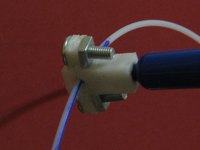
Another simple and effective technique recently involved use of a garden-variety marker pen writing on the input filament as seen in the image. While colors can be changed, this approach also suffers from the "when does it come out?" problem. 
 
A RepRap experiment last year attempted to use inkjets, but this was really not for coloring solids, but for laying down special substances in small amounts - like electrical traces or sticky parts, etc. 
 
Makerbot hosts a wiki page that investigates the problem of color 3D printing, and the conclusion is that to do it properly, it's pretty complex. New hardware is clearly required, as well as serious software upgrades. Worse, STL format might have to be changed to account for color information. 
 
Bottom line: Buy some colored markers. 

 
Tuesday
Jan122010

Full Color 3D Printing

Yes, that's right - Shapeways now offers full color 3D printing. They've scored a ZCorp 650 3D printer, which provides the color capability. The "Full Color Sandstone" material is able to handle color texture maps. 
 
It's obviously more work to prepare color models. You must create a texture map in your 3D modelling software for your object, and then export it as a VRML97 or X3D file. Zip it and the texture map images and you're then able to upload to Shapeways. But we think it's worth the extra effort. 
 
This is a big change in the 3D print services environment. Now full color printing is available at relatively low cost to practically anyone through Shapeways' popular print service. In fact they say:
 
This is our least expensive material and the pricing is $0.99 per Cubic Centimeter ($16.22 per cubic Inch + $ 1.50 start up costs per model, these prices include worldwide shipping)
 
One can imagine the items being pulled out of their 650 over the next few months. 
 
At the rate Shapeways keeps adding new features, we're figuring that by end of 2010 Shapeways will offer food printing too. In color.