
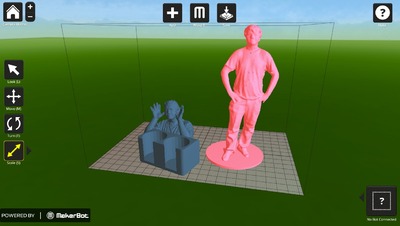
 Along with yesterday’s blockbuster announcement of MakerBot’s Replicator 2, MakerBot also announced, MakerWare, new software to supersede the long-used ReplicatorG, at least on the Replicator line.
 MakerWare performs the usual 3D printer management tasks: loading and orienting a model onto the print bed; resizing models; slicing the model into GCODE; sending GCODE to the printer; managing the print operation.
But there’s some very key differences in MakerWare.
MakerWare offers dramatically faster slicing operations. This is required for models being printed at high resolution on the Rep2. Evidently slicing is up to 20 times faster than the old ReplicatorG software that used the sluggish and largely incomprehensible Skeinforge software under its covers.
The speed is achieved through the use of new slicing software called “Miracle Grue”, developed by MakerBot. MakerBot’s tagline for this software is:
A Magic Toolpathing software. A bag of soil for growing 3d objects. A green thing found in twisty turny passages.
We think this is awesome, as the 3D printing community has mostly expressed frustration with the Skeinforge engine. Skeinforge was designed as a general CNC pathing tool and was co-opted by many 3D printer manufacturers and hobbyists for 3D printing experiments. But it came with big costs: glacial speed and a massive set of control parameters that are beyond normal human comprehension.
MakerWare supports more than just STL model files. Makerware supports OBJ files; this is the first time we’ve seen hobby-level 3D print drivers accept OBJ format. This capability makes it slightly easier to use a wider spread of 3D modeling tools without requiring a conversion step.
Print bed management capabilities are introduced. The ability to place multiple objects on the bed for printing in a single print run. This enables the Rep2 to soak up many models for a long overnight run in the same way that much more expensive commercial 3D printers operate. You can even save a collection of models you’ve laid out for subsequent printing or sharing. “Print me another tray of those hammock clamps, please!”
MakerWare is much easier to use. It’s attractive visual interface invites the operator to drag and drop models into an effective bed layout. Resizing can be done by dragging or numerically. The software works on all popular platforms: Windows, OSX and Linux, as MakerBot has ensured in the past for previous software.
Is it really as fast as advertised? We’re not certain; we tested the software, but it won’t seem to slice unless there is a species Replicator of attached. And we don’t have one yet.
Is it as easy to use as advertised? Definitely. The visual interface is totally clear and all frequently used commands are just a touch away. More complex tasks are easily unearthed by clicking on prominent “arrows”. The parameter complexity of previous software is now suitably hidden away. Even the “Advanced” control pane is easy to understand.
A great big step by MakerBot.
Via MakerBot

Yes, it is very fast!
I tried it in a laptop/Ubuntu 11.04 and the program also loads much, much faster than ReplicatorG 0034.
There's no need to have a Replicator attached to test how fast it slices.