
 SketchUp is a free 3D modeling tool that is quite often the very first exposure to 3D modeling for many people. But is it appropriate for producing 3D models for printing?
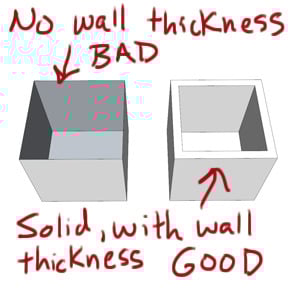
 First off, we must say that SketchUp was not designed with 3D printing in mind; instead it was, like many 3D modeling tools, designed to produce visual 3D representations. While this output appears to your eye to be 3D, it really isn’t and this shows when you try to 3D print. For example, 2D surfaces are often used in SketchUp. These have a thickness of, well, zero! They cannot be printed. That’s one of several issues encountered when using SketchUp for 3D printing.
We recently encountered a situation where someone wished to 3D print a SketchUp model they’d developed. The model *looked* ok, but in fact was completely unprintable and had to be totally re-engineered in a “real” 3D modeling tool.
That all said, it is possible to use SketchUp to produce printable 3D models – if you carefully follow some rules when you develop your model. But what are the rules?
Shapeways points out a terrific post on MasterSketchUp by Marcus Ritland that explains what you need to do. Some of these apply to many 3D modeling programs, in case you’re not using SketchUp. Among the rules are:
- Make it solid
- Ensure walls have thickness
- Scale up to permit detailed features
- Smooth curves
- Build as components
- Use plugins to assist export and inspection
- Consider material constraints
- Reduce the solid size to conserve material
But you’d better read all the details at the link below.
Via MasterSketchUp
