
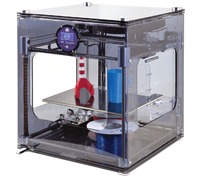
 After yesterday’s announcement from 3D Systems / BFB on their new 3DTouch printer, we sought additional details. Today we’ve learned a few more things about this very interesting device, including why it’s called the “3DTouch”. Check out the much more detailed image above (click for larger view). Here’s our latest findings:
 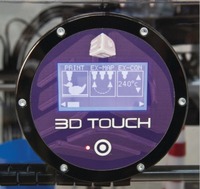 The “touch” refers to the method of operating the device. It now has a touch panel conveniently pasted on the top front of the machine. To proceed through menus and controls, you simply touch soft buttons. This is much improved over the 3DTouch’s predecessor, the BFB 3000, in which the device is controlled via teeny physical push buttons. Take a look at this control panel above (click for larger view).
 The print files generated by BFB’s Axon2 software are received on a USB storage device. Previously, an SD card was used. This will be much more convenient since most computers don’t have an SD interface.
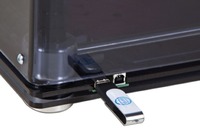 There’s mention of “USB connectivity”, but we still don’t understand exactly what that is. We’re hoping you can drive the printer directly from a computer via USB, but this might not be the case.
 BFB is now mentioning that you can dissolve Clear Translucent PLA in a “sodium hydroxide solution used with a heated ultrasonic tank”, but that “care is required with this option.” For sure.
“Increased z move speed and accuracy” is mentioned, which should improve print quality.
Otherwise the specs we’ve seen seem to be pretty much the same as the BFB 3000, suggesting that the 3DTouch is really a “BFB 4000”. The BFB 3000 was a great machine and the 3DTouch looks even better.
Via BFB
