
Sponsors

Recommended
  • Rule 34
    Rule 34
    by Charles Stross

    Stross delves into a possible future where 3D printers become commonplace - and explores the problems that could result. 

  • Printing in Plastic: Build Your Own 3D Printer (Technology in Action)
    Printing in Plastic: Build Your Own 3D Printer (Technology in Action)
    by James Floyd Kelly, Patrick Hood-Daniel
  • 3Dconnexion SpaceNavigator SE (Standard Edition) 3D Navigation Device USB ( 3DX-700028 )
    3Dconnexion SpaceNavigator SE (Standard Edition) 3D Navigation Device USB ( 3DX-700028 )
    3D Connexion
  • The Homebrew Industrial Revolution: A Low-Overhead Manifesto
    The Homebrew Industrial Revolution: A Low-Overhead Manifesto
    by Kevin A. Carson
  • Mastering Blender
    Mastering Blender
    by Tony Mullen
  • Kindle Wireless Reading Device (6
    Kindle Wireless Reading Device (6" Display, Global Wireless, Latest Generation)
    Amazon.com
  • Blender 3D 2.49 Incredible Machines
    Blender 3D 2.49 Incredible Machines
    by Allan Brito
  • Makers
    Makers
    by Cory Doctorow
  • 3Dconnexion SpacePilot PRO - 3D motion controller - 31 button(s) - wired - USB
    3Dconnexion SpacePilot PRO - 3D motion controller - 31 button(s) - wired - USB
    3D Connexion
« MakerBot's StepStruder Released | Main | Molding a 3D Printer »
Thursday
Feb242011

See It Before You Download It

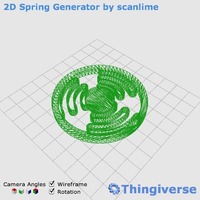
Content is king once you have a 3D printer. You need things to print, after all! But one of the main repositories for free printable 3D models, Thingiverse, has prepared a wonderful upgrade to their service: 3D viewing of models - before you print them!
 
While there are a ton of models at Thingiverse, it's sometimes difficult to understand what they are because the associated picture is taken poorly or the model itself doesn't lend itself to 2D rendering. The new Thingiview javascript feature solves this entirely by showing you a rotating 3D view of the object in question. Here are the key features:
 
  • Solid or wireframe views
  • Instant X, Y, Z or perspective view
  • Smooth automatic rotation
  • Near instant use by clicking a button on the item's image.
 
Sounds great, but is there a catch? Yes! Your browser must be WebGL-enabled. This means you must have a really recent version of Chrome, Firefox or Safari, and for heaven's sake, put away that old Internet Explorer version 6!  
 

Reader Comments

There are no comments for this journal entry. To create a new comment, use the form below.

PostPost a New Comment

Enter your information below to add a new comment.

My response is on my own website »
Author Email (optional):
Author URL (optional):
Post:
 
Some HTML allowed: <a href="" title=""> <abbr title=""> <acronym title=""> <b> <blockquote cite=""> <code> <em> <i> <strike> <strong>
