
Sponsors

Recommended
  • Rule 34
    Rule 34
    by Charles Stross

    Stross delves into a possible future where 3D printers become commonplace - and explores the problems that could result. 

  • Printing in Plastic: Build Your Own 3D Printer (Technology in Action)
    Printing in Plastic: Build Your Own 3D Printer (Technology in Action)
    by James Floyd Kelly, Patrick Hood-Daniel
  • 3Dconnexion SpaceNavigator SE (Standard Edition) 3D Navigation Device USB ( 3DX-700028 )
    3Dconnexion SpaceNavigator SE (Standard Edition) 3D Navigation Device USB ( 3DX-700028 )
    3D Connexion
  • The Homebrew Industrial Revolution: A Low-Overhead Manifesto
    The Homebrew Industrial Revolution: A Low-Overhead Manifesto
    by Kevin A. Carson
  • Mastering Blender
    Mastering Blender
    by Tony Mullen
  • Kindle Wireless Reading Device (6
    Kindle Wireless Reading Device (6" Display, Global Wireless, Latest Generation)
    Amazon.com
  • Blender 3D 2.49 Incredible Machines
    Blender 3D 2.49 Incredible Machines
    by Allan Brito
  • Makers
    Makers
    by Cory Doctorow
  • 3Dconnexion SpacePilot PRO - 3D motion controller - 31 button(s) - wired - USB
    3Dconnexion SpacePilot PRO - 3D motion controller - 31 button(s) - wired - USB
    3D Connexion
« Could the Trabant ReMaterialise? | Main | Glass Printing »
Tuesday
Sep292009

DAVID-laserscanner … in a Box!


We wrote about the free DAVID scanner software quite a while ago, and while it was inexpensive, it was mostly software and lots of instructions for how to set up your scanning platform and buying the appropriate cameras and lasers.

Now that's changed - A1 Technologies, the folks behind the very inexpensive RapMan 3D printer, have put together a "Starter-Kit" that includes all the bits you'd need to get scanning right away. The best part: it's only £ 320.00 (USD$520ish). What do you get in the kit?

  • high-resolution 2-megapixel webcam (1600 x 1200) with autofocus
  • stand for webcam
  • red line laser module (650 nm, Class 1 laser) with adjustable focus, including battery
  • calibration panels (for three different object sizes)
  • base plate for mounting the calibration panels
  • DAVID Laserscanner Professional Edition software on a USB Flash Drive
  • User manual

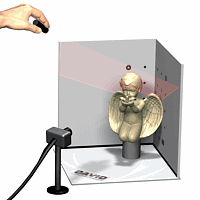
Here's how it works:

To obtain the required data users simply hold the laser in their hand and sweep the laser line over the object to be scanned.  The DAVID-laserscanner will immediately generate a 3D model in your PC, capturing even fine surface details of less than 0.2 mm. Simply scan all sides of the object separately, including the top and bottom. With DAVID-Shapefusion it is possible to merge multiple scans that were made from different sensor directions in order to get a complete, textured 360˚ model.


And yes, it's Windows only, and is certified safe for use in classrooms, offices or your kitchen, we suppose, too. Regardless of source, you can scan and produce reasonable 3D scans in OBJ, .STL or PLY formats.

Via A1 Technologies (Hat tip to Rachel)

Reader Comments (1)

pretty cool stuff here thank you!!!!!!!

August 27, 2010 | Unregistered CommenterLeupoldEst

PostPost a New Comment

Enter your information below to add a new comment.

My response is on my own website »
Author Email (optional):
Author URL (optional):
Post:
 
Some HTML allowed: <a href="" title=""> <abbr title=""> <acronym title=""> <b> <blockquote cite=""> <code> <em> <i> <strike> <strong>